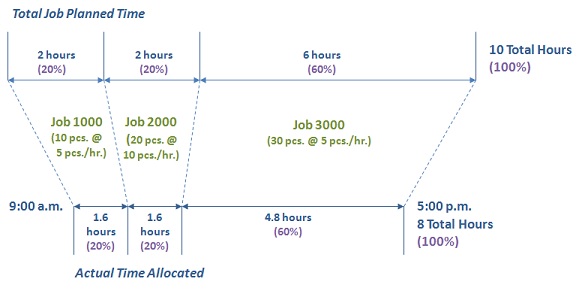
A Multi-Job transaction is defined as one employee using one work center that produces several jobs at the same time.
Multi-Job transactions are created when an employee works on a single work center that produces more than one job at the same time. Multi-Job can also be utilized for employees working on a multitude of small duration, rapidly changing jobs. In this type of situation, it is not practical for the employee to attempt to calculate the amount of time (labor hours) that each piece should have allocated, nor is it realistic for the employee to run back and forth to the time clock.
Multi-Job transactions can be for either Setup or Run labor and cannot be used to allocate both in the same transaction set. The key to a Multi-Job transaction is that it involves work that is being produced in the same work center. Examples of work centers that can utilize Multi-Job transactions are cutoff saws, multi-pallet CNC machining centers, anodizing tanks, laser burning machines, CNC routers, robot welders, paint lines, etc.
Multi-Job uses a method of allocating actual time to each job in accordance with the planned time necessary for each job. The key to understanding the time allocation is to understand that each piece produced must have a routing operation. The planned time for the routing operation is used to calculate the actual time spent on the job. The routing operation planned time is defined on the Job Operations form. If no time is set up in the routing operation, no time will be allocated to the job.
NOTE: The Quantity Worked On is used to split the hours versus the Quantity Complete because the two can differ. In longer running jobs, even though the jobs are started, there may be times when the employee does not actually complete any pieces.
When costing a Multi-Job transaction, actual Run or Setup hours are split based on the schedule driver’s (Labor, Machine, or Fixed) planned time and the quantity worked on. The full manufacturing rate and full labor overhead are then applied to the allocated hours.
Bob's manufacturing rate is $15 per hour. The overhead for Bob's department is $25 per hour. At 9:00 a.m. Bob starts working on Jobs 1000, 2000, and 3000 in the same work center. He works 8 hours and ends all three jobs at 5:00 p.m. Bob worked on 10 pieces for Job 1000, 20 pieces for Job 2000, and 30 pieces for Job 3000.
Multi-Job Time Allocation Summary - Based on Planned Labor Time |
||||||
Job |
Qty Worked On |
Job Routing Type |
Job Route Standard |
Calculated Planned Time |
Percent to Allocate |
Allocated Hours |
1000 |
10 |
Pieces per Labor Hour |
5 |
2 |
20% |
1.6 |
2000 |
20 |
Pieces per Labor Hour |
10 |
2 |
20% |
1.6 |
3000 |
30 |
Pieces per Labor Hour |
5 |
6 |
60% |
4.8 |
|
|
|
|
Total Time Worked |
8 |
|
With the job routing defined as Fixed Scheduled the algorithm allocates time to the fixed scheduled job by dividing the total time worked by the number of jobs. The remaining time is allocated utilizing standard multi-job calculations. A total hours worked of 8 on 4 jobs will allocate 2 hours to job 4000. The remaining 6 hours are allocated to jobs 1000, 2000, and 3000.
Multi-Job Time Allocation Summary - Adding a Fixed Scheduled Job |
||||||
Job |
Qty Worked On |
Job Routing Type |
Job Route Standard |
Calculated Planned Time |
Percent to Allocate |
Allocated Hours |
1000 |
10 |
Pieces per Labor Hour |
5 |
2 |
20% |
1.2 |
2000 |
20 |
Pieces per Labor Hour |
10 |
2 |
20% |
1.2 |
3000 |
30 |
Pieces per Labor Hour |
5 |
6 |
60% |
3.6 |
4000 |
N/A |
Fixed Scheduled Hours |
N/A |
8 Hours / 4 Jobs = 2 |
N/A |
2 |
|
|
|
|
Total Time Worked |
8 |
|
A special function has been added to Multi-Job that allows machines to operate unattended until the work is finished (for example, a laser burning machine). While the machine is running unattended, many companies will have the operator work on some miscellaneous tasks, such as grinding, polishing, deburring, etc. This allows the operator to be productive vs. watching the machine operate. This work is considered miscellaneous and is secondary to the primary work center. Multi-Job will allow the employee to enter transactions on a second work center, not the same as the original (primary) work center. The time allocated to the secondary job uses the planned time defined in the routing standard and is not allocated amongst the primary jobs.
The Secondary Job Costs check box on the Flags tab of the Shop-Trak Parameters form allows the Administrator to determine if the secondary job is charged the full labor rate of the employee or a zero rate. If this check box is selected, any secondary pieces are costed at the planned cost determined in the routing standard for the secondary job, including labor. If this check box is cleared, no labor costs are charged to the secondary job. Time and related overhead, however, are still charged to the secondary job.
The strategy of allowing a zero rate is that the time and related overhead will still be charged to the secondary job, but since the primary work center is being charged the full labor rate, the secondary Job could be considered a no charge operation. Note that the secondary job does not get the full attention of the operator; accordingly the actual time to produce pieces usually takes longer than the planned time. Knowing that the operator is actually charging time to the primary work center makes these jobs potentially free. This is the choice of management to choose no rate or the employee’s manufacturing rate.
NOTE: If the secondary job's planned time is more time than assigned on the primary jobs, Shop-Trak will assume that the jobs reported as secondary were actually primary and allocate accordingly. The schedule driver of the job's operation will be used for determining which plans to utilize for the allocations (Labor, Machine, or Fixed).
Multi-Job Time Allocation Summary - Adding a Secondary Job |
||||||
Job |
Qty Worked On |
Job Routing Type |
Job Route Standard |
Calculated Planned Time |
Percent to Allocate |
Allocated Hours |
1000 |
10 |
Pieces per Labor Hour |
5 |
2 |
20% |
1.6 |
2000 |
20 |
Pieces per Labor Hour |
10 |
2 |
20% |
1.6 |
3000 |
30 |
Pieces per Labor Hour |
5 |
6 |
60% |
4.8 |
Total Time Worked - Primary Jobs |
8 |
|||||
9000 |
10 |
Pieces per Labor |
20 |
.5 |
NA |
NA |
Total Time Worked - Secondary Job |
.5 |
|||||
Using the same rates as in the previous Multi-Job example, the Cost for the secondary job is:
Job 9000 (Secondary Job Costs check box = Selected): (Labor = .5 hours * $15 per hour = $7.50) + (Overhead = .5 hours * $25 per hour = $12.50) = Total Cost of $19.50.
or
Job 9000 (Secondary Job Costs check box = Cleared): (Labor = $0) + (Overhead = .5 hours * $25 per hour = $12.50) = Total Cost of $12.50.
Shop-Trak Defining Flags Parameters